Maj Michael Thomas
Paper 1045
To address the extensive GIS requirements and build a GIS foundation for the National Guard Counterdrug program, the Georgia Tech Research Institute and Naval Research Laboratory have developed a Digital Mapping Server (DMS). The DMS is a virtual server which provides a portal to GIS data without the end-user having to manipulate, handle, or reformat the data. This system allows all Federal, State and Local Government to access geospatial data from verifiable sources. ArcIMS and Government Off The Shelf technologies generate map services for both ArcGIS and web browser clients.
The National Guard Bureau - Counterdrug Office (NGB-CD), through its Counterdrug Geographical Regional Assessment Sensor System (CD-GRASS) program has incorporated and collaboratively networked many technologies including a Digital Mapping Server (DMS) portal. The DMS portal ties many disparate GIS databases together into one single interface with the capability to perform projection translation on the fly as necessary as well as allowing the user to add datasets from their own systems. This program is leveraging both the commercial-off-the-shelf (COTS) ESRI ArcIMS software as well as the Geospatial Information Database (GIDB) software which was created by the Naval Research Lab at Stennis Space Center (NRLSSC) for the Government (government-off-the-shelf, GOTS). The DMS portal is a joint effort between the Naval Research Lab at Stennis Space Center, Georgia Institute of Technology, and the National Guard Bureau Counterdrug Office. The DMS portal was designed to provide dedicated mapping and GIS support to NGB-CD and drug law enforcement agencies (DLEAs), as well as assisting NGB-CD's Digital Mapping Center (DMC); counterdrug GIS training (CD-GIST) program, and counterdrug Decision Support System. [See http://ngbcdtech.gtri.gatech.edu/ for more information.]
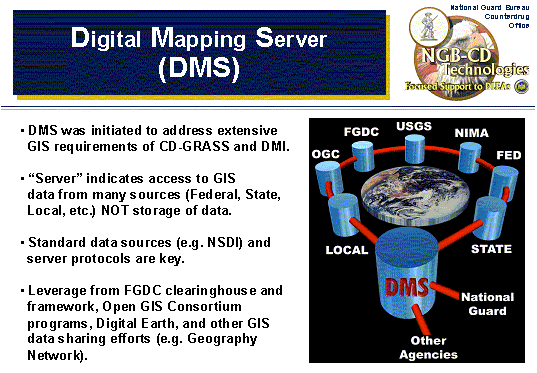
Data Sources come in many forms - as long as they are properly geo-coded these data layers can be fused together; annotated; correlated; analyzed; and new mapping products formed. NOTE: These data layers can come from many locations and remain at those locations even though they are being shared and used together. This is the purpose of the "portal" - it is NOT a reservoir of all data - it is the vehicle which intelligently links the data sets requested for custom mapping applications and analyses while each data owner retains control of his/her own data. [i.e. the users can keep their data locally while creating maps using remote GIS data.]
NGB CD’s DMS Portal is based on
the Naval Research Laboratory’s (NRL) Geospatial Information Database (GIDB)
Portal System and is a standards-based portal for geospatial information
discovery, access and mapping over the Internet. DMS focuses on 3 GIS user groups – the
casual user, the operational user and the power user. A recent analysis estimated that the
ratio of these three types of users was 1000:20:1. The casual user can access and engage
DMS via the webpage at http://ngbcdmaps.gtri.gatech.edu/.
The website is the DMS primary access to over 300 servers, 1000 services and
multiple data sources that currently exist on the web. Operational users and Power users can
access the same data via the Web Client at http://dms2.gtri.gatech.edu/web/webClient.html
. The Web Client accesses the same data, but rather than looking at it organized
by server, it is organized by theme and layer for a user defined area of
interest (AOI). The power user can
download software that allows for not only viewing the same data individually,
but multiple services and datasets can be viewed concurrently and “fused” with
existing relational DBs in several formats. This piece (GIDB) of the Portal
System technology has been under development at NRL for the past nine years
culminating in the most advanced geospatial portal now available. GIDB was originally conceived as a
completely object-oriented research prototype for mapping data nine years
ago. It has matured into a
multi-tiered system that provides access to massive amounts of geospatial data
from distributed, heterogeneous sources over the Internet and SIPRNET. The system was developed in Java for
platform portability. Its
components include a downloadable thick client, a Web browser-based thin client,
a PDA client and a flexible, plug-in server architecture (implemented as a Java
servlet) that can allow data of any origin to be distributed to the
clients. An open source, all Java
object-oriented database management system, called Ozone, is also available for
deployments requiring custom data storage.
Both the full GIDB and the Web Client presently connect the user to over 565
Services and over 103 Servers. The
entire system is government-owned and requires no licensing. You can utilize both of them now at http://ngbcdmaps.gtri.gatech.edu/
or at http://dmap.nrlssc.navy.mil/.
Choose the thin client (browser
based), the thick client (download and auto install for additional features) or
the PDA client to interact with the vast amounts of geospatial information
available. DMS is area-of-interest
and theme-of-interest driven for ease of use (from a neighborhood-level to CONUS
or foreign country-level of resolution).
DMS
is currently in use by NGB CD in support of counter drug agents and agencies
nationwide. This technology is also
in use at NIMA’s Gateway SIPRNET site (under prototype systems) allowing the
dissemination of local file system information at the NIMA Gateway as well as
integrating that information with multiple other non-NIMA sources via the
SIPRNET. These two key transitions
have allowed Counter Drug law enforcement on the Internet and all DoD users on
the SIPRNET to go to a “Geospatial One-Stop” for integrating data from multiple
servers and services. It was also showcased in the latest National
Counterterrorism Exercise, TOPOFF2, that finished in May 2003.
Finally, DMS’s technology is being transitioned in FY04 as the next
generation delivery mechanism for oceanographic, meteorological and
environmental data to the U.S. Navy through the SPAWAR PMW-155 program Tactical
Environmental Data Services (TEDServices).
Figure 1 describes and
illustrates the ideas behind the DMS portal. NOTE: When this graphic was
originally created (over 1 year ago) many of these data sets were only
hypothetical. However, nearly all of these data sources have been incorporated
to date within the DMS portal. Keep checking back at the web-link at bottom of
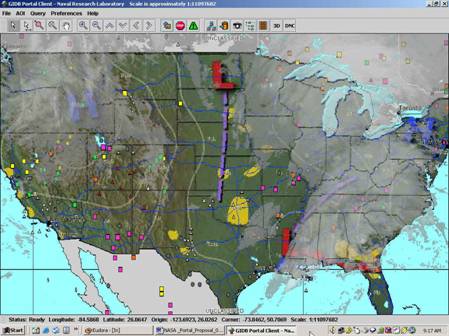
the figure for updates. An example of DMS is shown below integrating cloud
cover, meteorological information, mineral locations, and other sources within
the thick client. DMS provides local, state and federal Drug Law
Enforcement Agents (DLEAs) with a real one stop approach for GIS support, and
provides crime analysts the ability to merge their own department data locally,
thus providing a secure analytical capability without compromising operator
security.
|
|
Figure 1: Conceptual Diagram of the Digital Mapping Server Portal and an Output of Fused Data Sources
The next few figures will show some example screen shots of the Government Off the Shelf (GOTS) side of the portal - the Geospatial Information Data Base™ System (GIDB). The GIDB offers a fully Object Oriented (OO) database approach to managing the input, storage, retrieval, presentation and mission integration of geospatial data. Since GIDB works in relation to a specific user defined area of interest (AOI), its primary focus is to improve the user's accessibility to spatial data for this region. It utilizes both public domain and commercial OO database technology to establish a portal type connection to various disparate database servers. Likewise it provides users with the capability to store, retrieve and integrate spatial data unique to their own application. GIDB presents this information in both 2D and 3D perspective views, while also offering the flexibility to query this data with reference to time and space.
Figure 2 shows an initial login screen for the GIDB - indicating the server housed with the Georgia Tech Research Institute in Atlanta, GA and linked with servers at the Naval Research Lab at Stennis Space Center, MS. The bottom half of Figure 2 shows the many servers we have access to all through this one interface - some public and open (such as "TerraServer" from Microsoft and "TIGER" from US Census Bureau and the Geography Network from ESRI and various servers running open standards and protocols such as those encouraged by the Open GIS Consortium and others); and some restricted databases (such as some of those maintained NRL). There are currently 8-10 databases (and more to come) that users have access to all over the US with data all over the world.
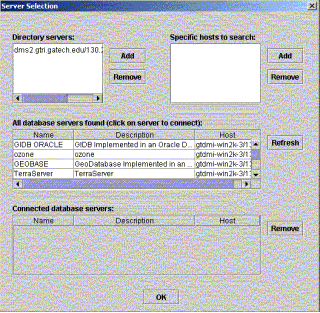
Figure 2: Server Selection Entry Screen to the
GIDB
Figure 3 is an example of a map produced using the GIDB via the DMS portal. This map shows TIGER street-lines overlaid on top of 1m imagery coming from TerraServer (showing through underneath). Although not pictured here, the user could also overlay data from their own computer or other remote servers as needed. The GIDB can import (and export) and overlay shapefiles for point source data.
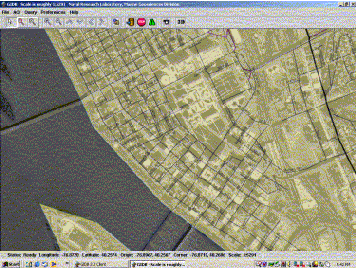
Figure 3: An Example Map from the GIDB
Interface
Figure 4 shows a map which has data imported from a local source. The GIS/map data shown here includes CADRG topos with TIGER street-line data overlaid with some transparency (so you can see the "mountainous" topo underneath). Then there are marijuana eradication data points overlaid on top which are coming from off the user's hard-drive onto this map created from GIS data off remote servers.
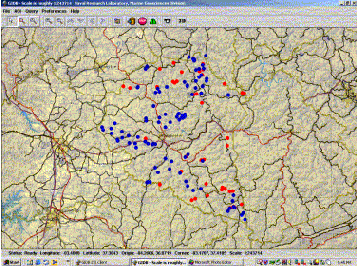
Figure 4: Another GIDB Map Example with
Imported Local
Shapefile Data and
Remote Vector and Raster Data
Figure 5 shows that by zooming into a small region of some of these marijuana eradication data points, we now have 1m imagery showing up underneath (TerraServer). At smaller levels with the GIDB 3D "fly-throughs" of your map can be created with the click of a button - see Figure 6, which shows the map in Figure 5 overlaid on the terrain.
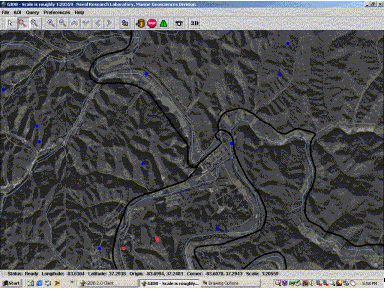
Figure 5: A Zoomed-in View of the Same Map from Figure
4
Below is the 3D map showing your map overlaid onto elevation/terrain data. [If this was live you would also be able to "fly-through" the current scene.]
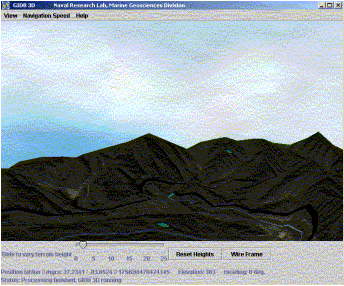
Figure 6: Figure 5 Overlaid on Terrain for a 3D View
[On-line this 3D view is interactive and allows the user to "fly-through"
the scene.]
In addition to the DMS portal, users can also download FREE software (ArcExplorer) which can also be used to create maps on the fly from data either local or remote (on the web or other networks). Once created, these files (*.AXL files) may be distributed to anyone else with ArcExplorer and the map is loaded automatically onto their computer (for viewing and interaction - the data is not actually downloaded). The National Guard's Digital Mapping Center is beginning to "deliver" some of their FREE maps in this format on CD.
Figure 7 shows a map similar to Figure 4 created using the free ArcExplorer software pulling point source eradication data off of the local hard-drive as well as GIS data from both the DMS portal and the Geography Network.
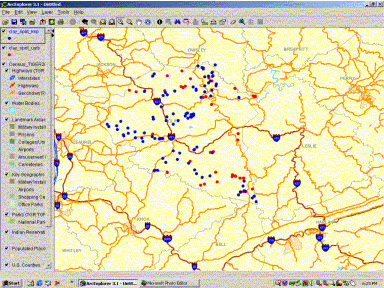
Figure 7: A Map Similar to Figure 4 Created with
ArcExplorer
Showing Point Source Data from the Local Hard-drive and
Vector
GIS Data from both the DMS portal and the Geography Network.
In summary, the National Guard DMS portal is currently still in development. Plans call to update the active site quarterly. Collaborative data-sharing efforts are continually being worked to minimize development time and maximize performance at low to no cost for our end users.